


.avif)

Why Toast + Thanx
Restaurants using Toast choose to integrate with Thanx for a few key reasons:
- Know who your best customers are — Without a loyalty program tied to your POS, most in-store transactions are anonymous. You might know what sold, but not who bought it. The integration changes that—so you can identify and reward your regulars.
- Reward guests automatically — Once a guest is enrolled, rewards and recognition happen behind the scenes. No manual tracking, manager comps, or guessing. Guests earn points, unlock perks, and receive personalized offers based on their real visit history.
- Reduce reliance on third-party platforms — When you own the guest relationship through your own loyalty program, you're less dependent on third-party ordering platforms. You can drive repeat visits directly and build a database of guests you can reach anytime.
- Keep operations simple for your team — Your staff shouldn't need to toggle between systems or manually reconcile data. The integration keeps workflows clean—transactions flow automatically, and enrollment happens in seconds during checkout.
What this integration unlocks
The Toast POS + Thanx integration is built to help you turn one-time in-store guests into loyal, repeat customers. Here's what it enables:
Capture loyalty signups at the point of sale
Your team can enroll guests into your loyalty program right at checkout, no app download or separate step required. Guests provide their phone number or email, and they're instantly enrolled and earning rewards.
Connect every in-store transaction to guest profiles
Once enrolled, every purchase at your Toast POS is automatically linked to that guest's profile in Thanx. You'll know who's visiting, how often, what they order, and how much they spend.
Build a complete view of guest behavior
Whether a guest orders in-store, online, or through delivery, their activity flows into a single profile. This gives you the full picture of how guests engage with your brand across channels.
Run targeted campaigns based on real purchase data
With transaction data in Thanx, you can segment guests by behavior—reward your top spenders, re-engage lapsed visitors, or celebrate milestones—all based on what's actually happening at the register.
What happens when a guest visits
Here's what the experience looks like in practice:
- Guest checks out at the POS. Your team asks if they'd like to join your loyalty program.
- Guest provides their phone number or email. Your staff enters it into the POS, and the guest is instantly invited to join the loyalty program.
- Transaction is linked to their profile. The purchase—including items, total, location, and timestamp—syncs to Thanx and is tied to that guest's account.
- Guest starts earning rewards. They receive a welcome message, start accumulating points, and become part of your engagement strategy.
- Future visits are automatically recognized. Every time they return and provide their phone or email, their purchases are credited to their profile.
This creates a seamless experience for guests and requires minimal effort from your team.
Technical overview
Here's what to expect from a technical and implementation perspective.
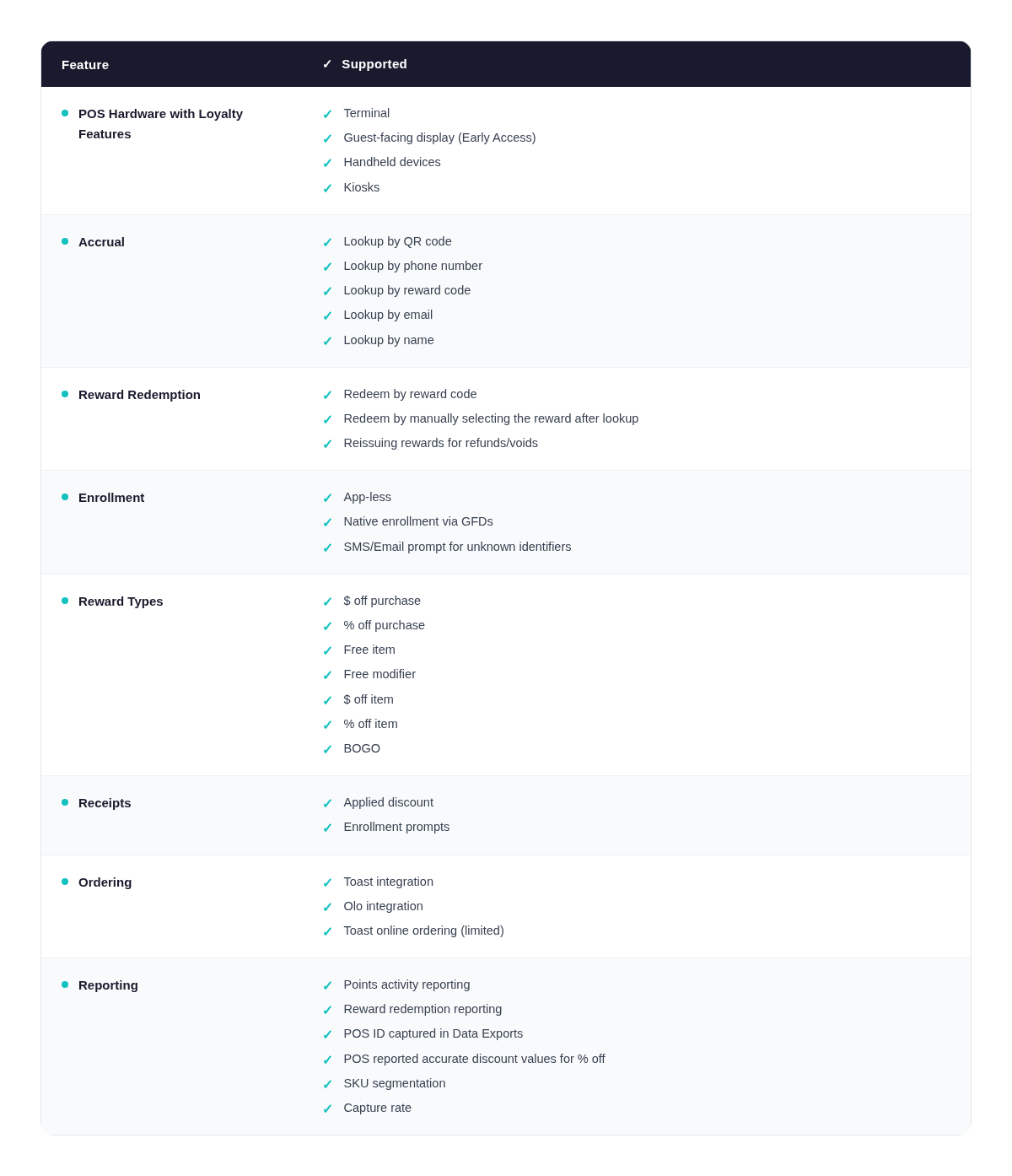
What data syncs
Exact mappings depend on your Toast configuration, but the integration typically includes:
- Transaction details (totals, item and modifier SKU)
- Location identifiers
- Guest identifiers (phone, email)
- Discount or tender indicators (where applicable)
Why this matters: it supports accurate guest profiles, consistent analytics, and the ability to run targeted campaigns without stitching together data from multiple sources.
Prerequisites
Before starting setup, confirm:
- Toast access: an admin or authorized team member who can enable partner integrations
- Locations in scope: a list of restaurants and any phased rollout approach
- Implementation owners: who will coordinate with Toast and Thanx
- Environment clarity: how you will test prior to launch
Setup steps (typical)
Your exact steps may vary based on your Toast environment, but most deployments follow this sequence.
- Enable the Thanx integration in Toast
- In Toast, find Thanx in the partner integrations catalog.
- Work with your dedicated Customer Success Manager to enable the integration and accept any prompts related to scope and permissions.
- Confirm location mapping
- Align how locations are represented in Toast and Thanx.
- Confirm any edge cases such as franchises, multi-entity setups, or region-based rollouts.
- Validate expected data flow
- Run test transactions.
- Confirm expected fields appear in Thanx.
- Confirm timing and any batching expectations.
- Pilot launch
- Start with a small set of locations.
- Confirm monitoring and reporting are behaving as expected.
- Roll out to remaining locations
- Expand based on results from the pilot.
How data flows
When a transaction occurs in Toast, Toast records and stores the transaction and related details. Through the enabled integration, a subset of that transaction data is made available so Thanx can keep its view of in-store activity aligned.
Most technical evaluation questions are answered by:
- Verifying the integration is enabled in the correct Toast account/group
- Confirming which locations are included
- Validating a sample set of transactions end-to-end
Support resources
- For Toast UI steps and partner integration settings, reference Toast documentation.
- For questions about Thanx-side configuration, data mapping expectations, or validation, work with your Thanx onboarding/support contacts.
Popular guides and tutorials
.avif)
.avif)