
.png)

.avif)

Configure a Reward Once. Use it Across Every Campaign
Every seasonal campaign, win-back offer, and birthday reward in your loyalty program starts the same way: with a configured reward. Done well, this takes minutes. If done inefficiently, like rebuilding the same offer from scratch every time you run a promotion, it becomes a hidden operational cost that slows down your marketing and introduces inconsistency.
Reward templates in Thanx solve this by separating the offer itself from the campaign it runs in. You configure a reward once like a free dessert, a $10 discount, or a complimentary upgrade and save it as a reusable template. Every future campaign that needs that offer simply pulls from your template library. The offer details stay consistent. The campaign-specific restrictions (valid dates, dayparts, eligible locations) get layered on top.
The result is a library of ready-to-deploy rewards that lets you launch a new promotion in minutes, respond to competitive opportunities immediately, and maintain consistent offer values across every campaign without rebuilding anything from scratch.
This guide walks through the complete process of creating reward templates on Thanx, from choosing the right reward type to testing, activation, and building a library that scales.
How It Works: Five Steps to a Production-Ready Reward Template
Step 1: Choose Your Reward Type
Every reward template starts with one foundational decision: discount-based or non-discount.
Discount rewards include percentage-based offers (10% off, 20% off) and fixed dollar amounts ($5 off, $10 off a $30 minimum). They're well-suited for driving larger transaction values and attracting price-sensitive guests. They're easy for guests to understand and calculate, which reduces friction at redemption. Buy X, Get Y structures are another option and reward a guest for purchasing one item by discounting or comping another. These are particularly effective for increasing average order size and driving attachment of high-margin add-ons.
Non-discount rewards include complimentary items (free appetizer, free dessert, complimentary upgrade) and experiential perks. They're effective for introducing guests to new menu items, rewarding high-value guests with something that feels personal, and building brand affinity without conditioning guests to expect a price reduction. Non-discount rewards often cost less to deliver than equivalent discount rewards while generating equal or higher guest satisfaction.
A complete template library includes both. Discount rewards for campaigns that need to drive immediate action. Non-discount rewards for relationship-building moments like birthday perks, VIP recognition, or service recovery.
Step 2: Name the Template for Reusability
Template names are internal. Guests never see them. That means the goal isn't to describe the campaign. It's to describe the reward in a way that makes it immediately identifiable to whoever is building a campaign six months from now.
Name the offer, not the occasion, unless you plan on using the reward only for the occasion.
- ✓ "Free Dessert"
- ✓ "$10 Off $30 Purchase"
- ✓ "Complimentary Appetizer"
- ✗ "Valentine's Day Promotion"
- ✗ "Summer Special"
- ✗ "Q3 Win-Back Offer"
A template named "Free Dessert" can be used for Valentine's Day, Mother's Day, birthday campaigns, service recovery, and VIP appreciation. All from a single saved configuration. The exception is if you plan on using one reward template for one occasion.
Step 3: Write the Guest-Facing Description
The reward description is what guests actually read when they receive the offer. It should be specific, clear, and action-oriented. No ambiguity about what the reward is or how to use it.
Weak: "Enjoy a special treat on us."Strong: "Enjoy a complimentary dessert of your choice with any entrée purchase."
Specificity reduces staff questions at redemption, prevents guest confusion, and sets accurate expectations. If there are exclusions or minimums attached at the campaign level, make sure the offer description leaves room for those to be communicated clearly when the reward is deployed.
Step 4: Configure Guest Support Access
One underused capability in Thanx reward templates is the option to make them available to your guest support team for service recovery.
When guest support access is enabled, your team can send the reward immediately to resolve a complaint, thank a loyal guest, or turn a negative experience into a positive one. No manager approval required. No building a one-off offer from scratch. The speed of this gesture is often what makes the difference between a recovered relationship and a lost guest.
Not every template should have this enabled. High-value offers or limited-time promotions may need to remain campaign-restricted. A good practice is to create a dedicated subset of templates explicitly for service recovery like "Complimentary Item - Service Recovery," "$10 Make Good Credit" with values that empower your team without creating budget risk. Enable guest support access only on those.
Step 5: Test Before You Activate
Before any template goes live, test it. Send the reward to yourself and at least one team member who will be processing redemptions. Walk through the full guest experience: how the offer appears in the app or email, whether the description is accurate, and how the redemption flows at the point of sale.
Specifically verify:
- Reward description is correct and free of errors
- Reward value displays accurately
- Any terms or minimums are communicated clearly
- The redemption process works end-to-end at the POS
Then get feedback from the team member who will be honoring the reward in person. Operational considerations that aren't visible in the app like how staff should handle partial redemptions, or what to do when a guest tries to combine offers surface quickly in this step and can be addressed before guests are involved.
Once testing is complete and the template is activated, it becomes available to pull into any campaign. Activation does not send the reward to any guests, it simply makes the template available in your library.
Real-World Example: Five Templates, Dozens of Campaigns
Consider a casual dining restaurant running a full calendar of promotions across seasonal occasions, daypart traffic goals, and guest lifecycle campaigns. Without a template library, every promotion requires a new offer build. With one, the same core set of rewards powers the entire year.
Their core template library:
- Free Dessert
- $10 Off $30 Purchase
- Complimentary Appetizer
- 20% Off Entire Check
- BOGO 50% Off Entrée
How those five templates map to a full campaign calendar:
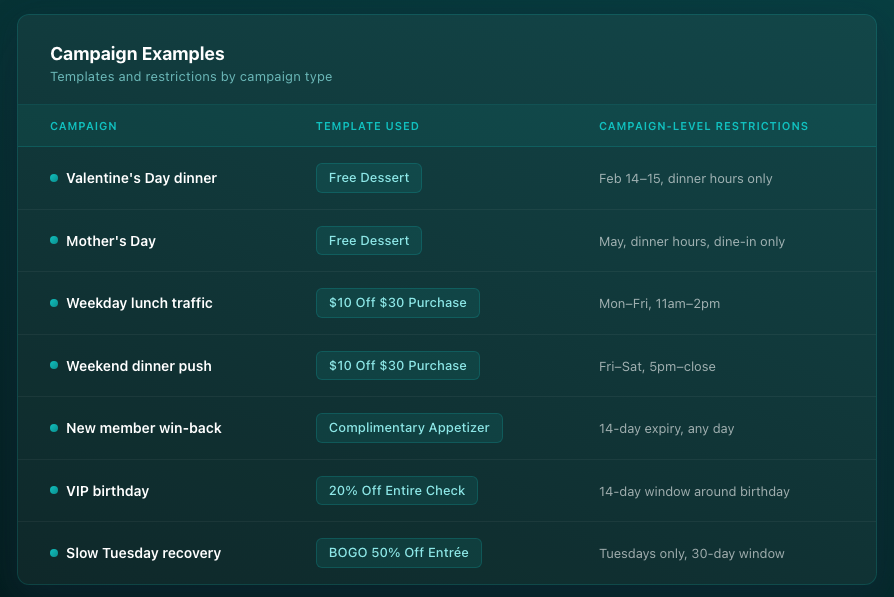
The template is always the same. The campaign wraps it in the restrictions that make it relevant to that specific goal. The restaurant launches seven distinct campaigns with five reusable builds and every future campaign that needs a free dessert already has one waiting.
This separation is the core architectural advantage of Thanx's offer management system. Most basic loyalty platforms require rebuilding offers for every campaign, which introduces inconsistency in offer values, slows down time-to-launch, and makes it difficult to maintain a coherent discount strategy across promotions. Thanx's template library eliminates all three problems.
Best Practices: What to Do (and What to Avoid)
Build your template library before you need it. The time pressure of an upcoming campaign is the wrong moment to be configuring offer values for the first time. Spend one focused session building your core 8–10 templates. Cover your most common discount levels, your key free items, and a service recovery set. That library will serve you for months.
Let campaign restrictions do the contextual work. Templates should be generic. Don't configure a template with a 14-day expiry baked into the fine print details or template creative because you need it for one campaign. The expiry belongs at the campaign level, not the template level.
Create a dedicated service recovery set. Identify three to five templates appropriate for guest support use. These should be modest in value, clearly named, guest support access enabled. Keep higher-value templates restricted to specific campaigns. This gives your team the speed to respond in the moment without creating liability from unrestricted access to premium offers.
Test every template at the POS before using it in a campaign. App display and POS behavior can differ. A reward that looks correct in the guest app may trigger questions at the register if the redemption flow isn't intuitive. Catching this in testing costs nothing. Discovering it after a campaign launches costs you guest trust.
Audit your library quarterly. Templates accumulate. Old offer values that no longer reflect your pricing, items that are no longer on your menu, descriptions that have drifted from current brand voice. Al of these create confusion. A quarterly review keeps your library clean and ensures every template in it is actually deployable.
Getting Started: Your First Template Library in Four Steps
Step 1: List your five most common promotional offers. These are the rewards you find yourself rebuilding most often i.e. your standard free item, your most-used discount level, your go-to win-back offer. These become your first five templates.
Step 2: Name them for reusability. Describe the reward, not the occasion. If you're tempted to include a date or event name, you're naming the campaign, not the template.
Step 3: Write guest-facing descriptions that are specific and complete. "Complimentary dessert of your choice with any entrée purchase" is ready to deploy. "Special offer" is not.
Step 4: Test with a team member who handles redemptions. Get their sign-off before activation. Their operational perspective will catch things you won't see from the marketing side.
Once your core library is built, every future campaign starts with a template pull instead of a configuration build and your time-to-launch shrinks from hours to minutes.
Frequently Asked Questions About Loyalty Program Reward Templates
What is a reward template in a loyalty program?
A reward template is a saved, reusable offer configuration including a free item, a percentage discount, a dollar-off offer that can be deployed across multiple campaigns without being rebuilt each time. Templates store the core offer details; campaign-specific settings like expiry dates, eligible days, and time restrictions are applied separately when the template is used in a campaign.
What's the difference between a reward template and a campaign?
A reward template defines what the offer is: the type, value, and guest-facing description. A campaign defines when and to whom the offer is sent: which guest segment receives it, when it's valid, and any redemption restrictions. Separating these means the same template can be reused across many campaigns with different parameters, without changing the underlying offer configuration.
What types of rewards can be configured as templates?
Common reward template types include percentage discounts (10% off, 20% off), fixed dollar amounts ($5 off, $10 off), free items (complimentary appetizer, free dessert), free modifiers (premium add-ons at no charge), and Buy X, Get Y structures (purchase one item, receive another at a discount or free). A complete template library includes both discount and non-discount options.
What is guest support access in a reward template?
Guest support access is a setting that makes a reward template available to your customer support team for service recovery. When enabled, support staff can send the reward directly to a guest in your dashboard to resolve a complaint, acknowledge a poor experience, or thank a loyal customer without manager approval or building a custom offer. It's most effective when applied to a dedicated subset of service recovery templates with appropriate value levels.
How does Thanx reward template management compare to other loyalty platforms?
Many legacy loyalty platforms require offers to be configured individually for each campaign, which increases setup time, introduces inconsistency across promotions, and makes it difficult to maintain a coherent discount strategy. Thanx's template library separates offer configuration from campaign deployment, allowing operators to build once and reuse across an unlimited number of campaigns. This reduces launch time, ensures offer consistency, and gives marketing teams full control without technical support.
Want to see how Thanx's offer management tools work for your program? Request a demo.
Popular guides and tutorials
.avif)
.avif)